Documentation sources
When the library has no solid answer, Live Answers may look on documentation sites an admin has listed — and only those.
Requires: an admin. The sites and the switch above them are on Settings → Live Answers; everybody else reads the list.
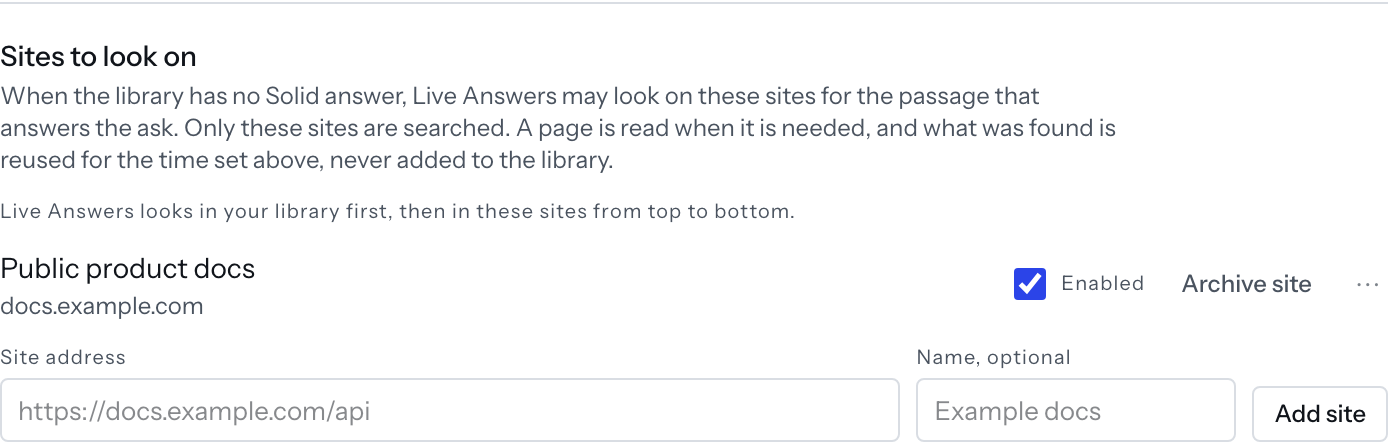
Add a site
- Turn on
Look up documentation during a call. With it off the sites are searched only after a call, and the controls below say so. - Type or paste an address into
Site address—https://docs.example.com/api, or a barehelp.example.org. - Give it a
Name, optional, then pressAdd site.
The line under the field shows what will be searched — Searches docs.example.com/api —
normalised as the server stores it. Only public https addresses are accepted, and a
refusal says which rule it broke and what a good address looks like.
A workspace carries up to 25 sites, the most one lookup can search. Adding another then says so and names the fix: archive one, and the rest keep working.
Order
Live Answers looks in your library first, then in these sites from top to bottom.
Move a site with Move up and Move down in its row menu; with the switch on, at the
ends they are present and off, with Already first. or Already last.
The first few sites are looked up at once, but the list decides between them and not the scores: the topmost site with a confident page wins, one above it that has not answered is waited for rather than skipped, and if none is confident the topmost that found anything wins.
Each row has its own Enabled switch and Archive site. Nothing is deleted — an
archived site stops being searched; the others carry on.
What a docs answer looks like
On a card the library answered: Looking in docs with the sites being asked, then the
page as its own block under the answer — From docs with how long ago it was fetched,
the page's words as a quote, the host and page title, a score line, Open the docs page
and Write it. Where the library had nothing and docs found a page, that page is the
card's body instead, with Nothing in the library for this. Write it makes this a snippet. beneath, or the reason the library could not answer.
A docs answer is never certified, and the card says where it came from before what it
says. Its score line's detail reads Capped at 59: the answer rests on documentation alone, so a docs page reads Fuzzy at best.
Write it beside the quote makes a snippet from it, carrying the page as its provenance.
When nothing was found the card says Nothing in docs. One that could not finish in
time says Looked up after the call.
Reuse
Docs answers are reused for sets how long an answer found on one call stands for the
same question before the page is read again — 0 to 24 hours, 6 by default. A call may
run 10 lookups; past that the card says Docs lookups for this call are used up (10). Looked up after the call.