Your workspace
Three resizable panes — library, canvas, preview — under one toolbar.
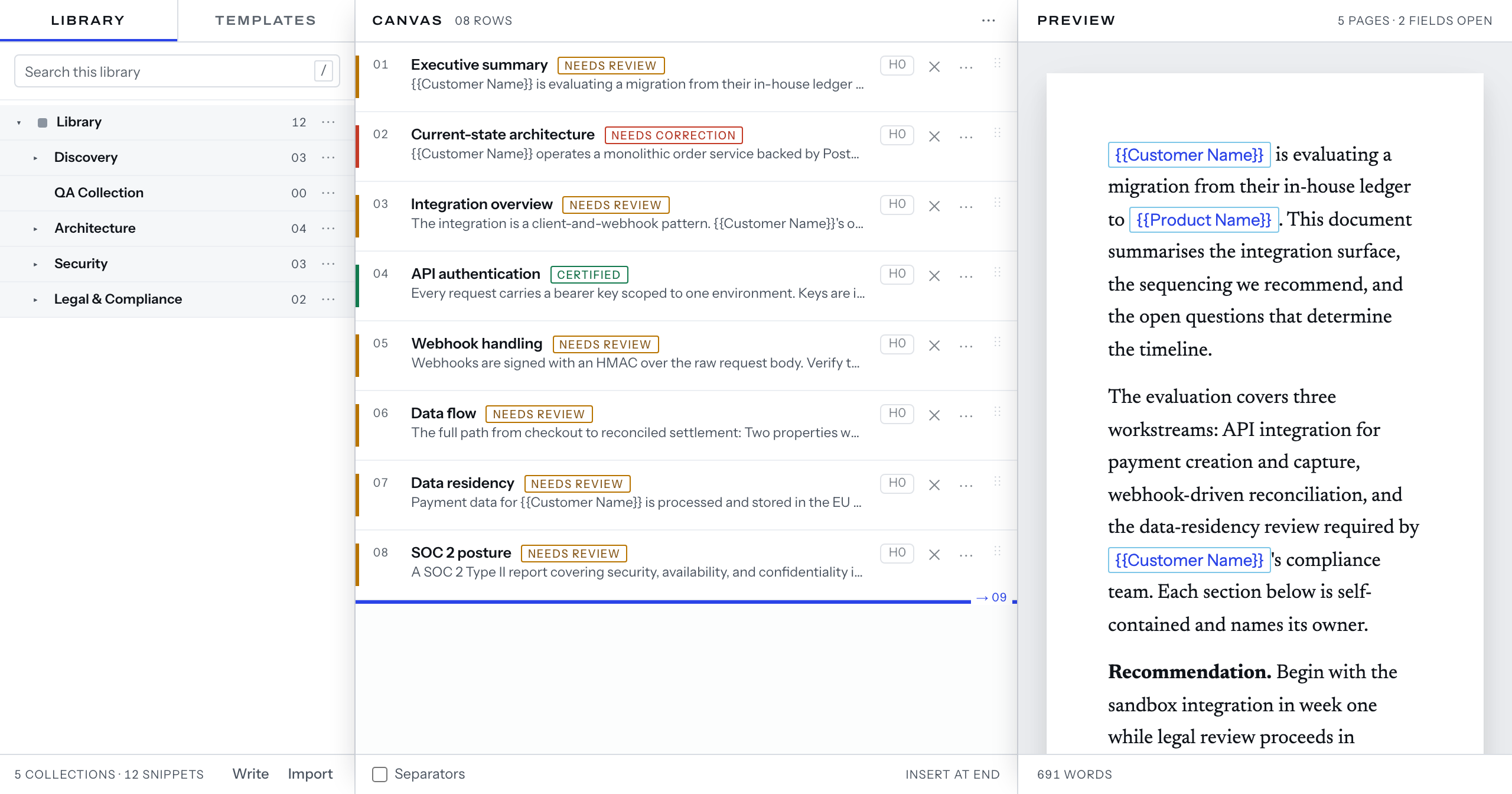
This page is the panes docked, the editor closed, no prompter running.
The three panes
Pane 1 has two tabs, Library and Templates, sharing one footer:
collections, snippets, Write, Import.
Pane 2 is Canvas, the rows zero-padded in its header. Opening a snippet puts
the editor in this pane.
Pane 3 is Preview — pages in its header, words in its footer, Nothing to preview yet. on an empty canvas. With the editor open it previews that
snippet. An active prompter takes the pane; popped out, it leaves the document
under a slim strip.
As the panes narrow
Under 1280px pane 3 undocks to an overlay and the second divider goes. Under
1024px one pane shows, neither divider is drawn, a Pane switch picks it, and
seven controls move into More: Rename document…, Copy document, Fields,
Live Answers, Documents, Library and Mappings.
Docked, each divider takes focus and sizes the pane on its left: ← and →
move it 16px, 64px with ⇧, Home and End to its limits. ⏎ collapses
pane 1 at the first divider and pane 3 at the second, as ⌘⌥[ and ⌘⌥] do.
Widths and collapse live in this browser.
The toolbar
The wordmark, the title with Rename, then the save line — SAVED with the
time, SAVING…, NOT SAVED — retrying, NOT SAVED — reconnect — absent until
this tab's first write, the state word alone at one pane.
1 snippet missing where there is one; Documents, Workspace, Library
and Mappings, one Go to menu at the overlay step; Resume prompter where
this browser holds a place; Start prompter, Preparing while one connects
and absent while one runs; Live Answers; the extension's dot and word;
Fields; Copy; Export; the avatar.
Keys
⌘K opens the command palette, / focuses library search while pane 1 shows,
and ? opens the Keyboard sheet; / and ? ignore focused fields.
Next: your first document.